


Showing posts with label technology. Show all posts
Showing posts with label technology. Show all posts
Sunday, October 14, 2012
What does it stand for? Acronyms and Abbreviations in English
When teaching or studying ESP it's very common to come across with a lot of abbreviations and acronyms .
An acronym is "a word formed from the first letters of the words that make up the name of something" (that's how it's defined by OALD, or Oxford Advanced Learners Dictionary).
And in this era of micro-blogging and fast written communication, more and more acronyms are created everyday (just have a look on Twitter's "TT" (Trending Topics) and you'll see that).
In the business area, acronyms are usually an important part of the professional jargon.

'What does it stand for?'
Take a look:
'What does ESP stand for?'
'It stands for English for Specific Purposes'.
Some acronyms can make the answer to this question quite complicated. That's why it's very helpful to have some resources at hand. Besides the traditional Google search engine and the online dictionaries, there are some websites like acronymfinder.com, acronymsearch.com and abbreviations.com.

But take care because an acronym can have lots of different meanings.
For instance, I looked for "ESP" in abbreviations.com and got over a hundred definitions!

TAFN. TA. SYS!
(That's all for now. Thanks a lot. See you soon!)
You may also like: 5 tips for ESP teachers
Beyond Google Translator

Saturday, August 4, 2012
Managing your classes with a free app for Ipad
Looking for a tool that can help you to manage your classes? So I strongly recommend that you check the 'Teacher KIT' FREE app for Ipad.
Previously known as "TeacherPal", the app was renamed after its last update, but it still keeps the same functionalities as described bellow.

Previously known as "TeacherPal", the app was renamed after its last update, but it still keeps the same functionalities as described bellow.


Once you have created your course timetable and registered your students, you can take attendance by simply clicking on the icon with the students' name or picture (yes, there's this very nice feature that allows you to add students to their profiles).
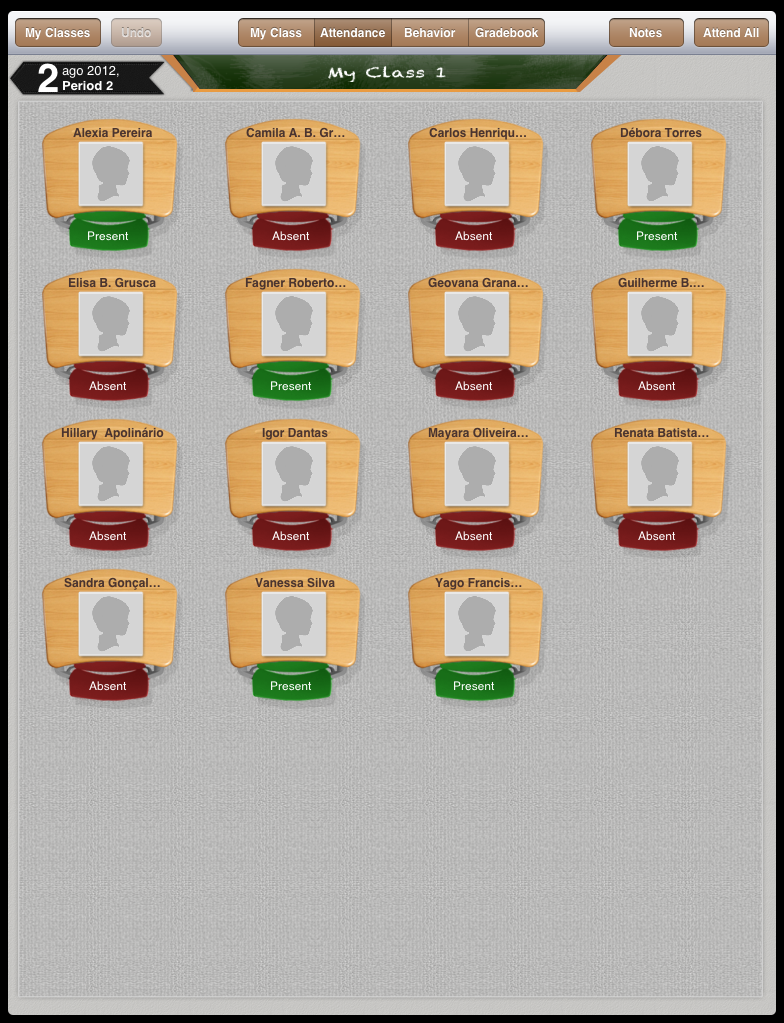
It's also possible to include students or parents contact information.
You can establish grades and their weights. And if you're worried about losing this important data, you can at anytime upload it to Itunes or send a report with the details to your email, on a spreadsheet that the app automatically generates.

If you teach private classes and have to manage your own groups, 'Teacher Kit' is really worth a try.
Check out this video for more details:
Marcadores:
app,
Education,
Ipad,
Mobile Learning,
Teaching,
technology,
tools
Tuesday, July 3, 2012
Mobile phones in the classroom
 The idea was to use the students own mobile phones to record themselves asking and answering some questions based on a reading activity they had previously done. It was also part of a project I developed while taking part in the English Language Certificate Program at the University of Oregon, in Eugene/Or during this winter.
The result was satisfactory for a first try, although I need to work a lot more on the methodology.
Check out this video with images of my students performing their tasks:
And I hope you like The Ramones...
***
Unfortunately, due some copyright issues with the song "Rock'n'roll High School" (performed by The Ramones) which I used as a soundtrack for the video, it's not available to mobile devices, which is a great irony. I also can't make any changes on the video, except for deleting it. I apologize for that. The video is really funny.
And youtube, you're not a punk rocker. =/
Marcadores:
Bring your own device,
BYOD,
Classroom,
Education,
English,
Experience,
Methods,
Mobile Learning,
Pedagogy,
project,
students,
teacher,
Teaching,
technology,
video
Sunday, July 1, 2012
Beyond Google Translator
On my previous post about ESP I mentioned Google as a possible resource for everyone looking for specific vocabulary. You can do what most people do, and simply Google a term for definitions or images that illustrate what you're trying to understand, and obviously, you can also use the Google Translator.
 Many of my students go straight to last option, just to find out what we teachers and all the other more experienced learners already know: Google translation technology is really cool, but when it goes to more specific language things don't work that well.
A good alternative to Google Translator is a very useful tool called Linguee. Basically, it's very similar to other online dictionaries or translators. But there's one huge and essential difference: when translating a word it gives you different extracts taken from the web, so you can actually see the word in different contexts.
Here we have a comparison between these two tools: I wanted to know the meaning of term 'piggyback' when applied to Logistics.
Google Translator showed the following results in Portuguese: "over someone's shoulder"; "to put". As you can see, there's no reference to transport or Logistics.
 |
| Google Translator: just the most obvious results |
Linguee results were a lot more interesting: it showed the most common meaning ("over someone shoulders"), but it also furnished the result that was exactly what I was looking for: "railroad combined transport".
 |
| Linguee: words in context |
Of course, Linguee won't solve all the problems, but it can be a very useful tool for ESP teachers and students, translators or anyone who has to deal with specific terminology.
Marcadores:
comparison,
English,
English for Logistics,
English for Specific Purposes,
ESP,
Google,
language,
Learning,
Linguee,
resources,
strategies,
Teaching,
technology,
Translation,
Translator
Sunday, June 17, 2012
Using mobile devices in the classroom
A week ago, the British educator Steve Wheeler posted on Twitter the following crucial question:
Maybe it's just a matter of time as we're still learning how to deal with all this tech issues, but by now we should have something else than just this talk of the potential of technology on Education.
In the Brazilian case, I'd say that we have bits of technology and even smaller pieces of pedagogy. Yes, we have a few computers at our schools and the students have their own gadgets, like smartphones, but I haven't seen it at work the way it should. In São Paulo, for instance, there's a State law forbidding the use of mobile phones in schools. But what if a teacher could create a learning situation in which a mobile gadget would be useful? Isn't it a paradox that they don't allow the use of the most common and handy device and still claim that more technology should be part of the school routines? Of course, there are many reasons Mobile Phones can cause trouble in the classroom, but the fact is that the students do bring their mobiles, even though they're not allowed. So, why don't we use them?
On this direction, there's this BYOD (bring your own device) trend, which I've been looking at with some enthusiasm. And I gave it a first try this past week. I asked my students at the public school where I teach to record themselves and a classmate saying a few sentences out loud. And to do that they had to use their mobile phones. I even recorded myself saying the sentences out loud and shared the file from my mobile to theirs via bluetooth technology. It wasn't the most revolutionary thing in the world but it worked. It was a pretty cool class.
And yes, I'm sorry that I broke a State law...
We have the technology. Do we have the pedagogy?My answer to this question would be 'no', although we're struggling hard to find it. And as far as I can see reading blogs & tweets on the web, this is a global concern.
Maybe it's just a matter of time as we're still learning how to deal with all this tech issues, but by now we should have something else than just this talk of the potential of technology on Education.
 |
| No Mobile Phones allowed in São Paulo - Brazil |
In the Brazilian case, I'd say that we have bits of technology and even smaller pieces of pedagogy. Yes, we have a few computers at our schools and the students have their own gadgets, like smartphones, but I haven't seen it at work the way it should. In São Paulo, for instance, there's a State law forbidding the use of mobile phones in schools. But what if a teacher could create a learning situation in which a mobile gadget would be useful? Isn't it a paradox that they don't allow the use of the most common and handy device and still claim that more technology should be part of the school routines? Of course, there are many reasons Mobile Phones can cause trouble in the classroom, but the fact is that the students do bring their mobiles, even though they're not allowed. So, why don't we use them?
 |
| A student using her own device during the English class. |
And yes, I'm sorry that I broke a State law...
Subscribe to:
Posts (Atom)